Kalzit is in early development. These pages describe what exists today and change as the milestones progress. Screenshots show the development version with demo data.
Data sources
A data source is a connection to a database or service that Kalzit queries. Data sources belong to an organization. For the interface behind this page, see the API for data sources and queries.
The list
Data sources shows a status overview (number of sources, kinds and that all are read-only, how many are not tested yet, median response time, the slowest, how many are down) and a list you can search by name or kind, filter by Status and sort (Name A–Z, Status, problems first, Newest first). Kinds are grouped as Tables, Metrics, Documents, Graphs, APIs and Files.
Test all tests every source. A status is Connected, Slow (answered in 500 ms or more), Unreachable, Test failed, Not tested, Dashboards only (you may not query it) or No access.
Details opens a side panel with two tabs:
- Overview: kind, result shapes (Table, Documents, Graph), when it was tested, and the actions Open in Explore, Test and Edit.
- Access: your own access (Query, Query and edit, Query, edit and manage access, or Saved queries in dashboards) and who has access beyond their role, with Manage access….
Editors and up see and query every data source; viewers see only the sources they are given. The server checks access on every request.
Adding a data source
Admins and owners (the datasources:write permission) add data sources: Add data source in the list or the New menu.
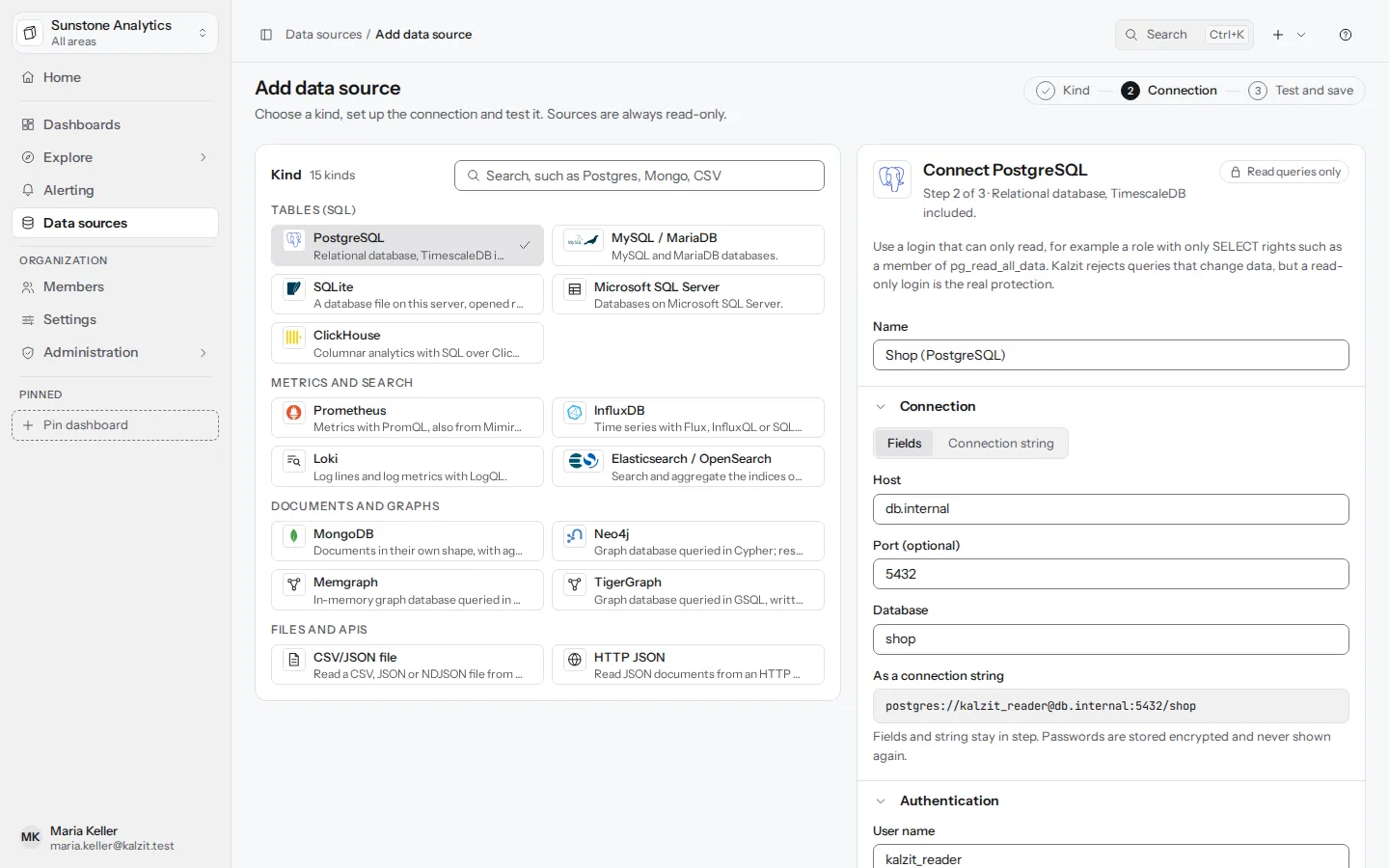
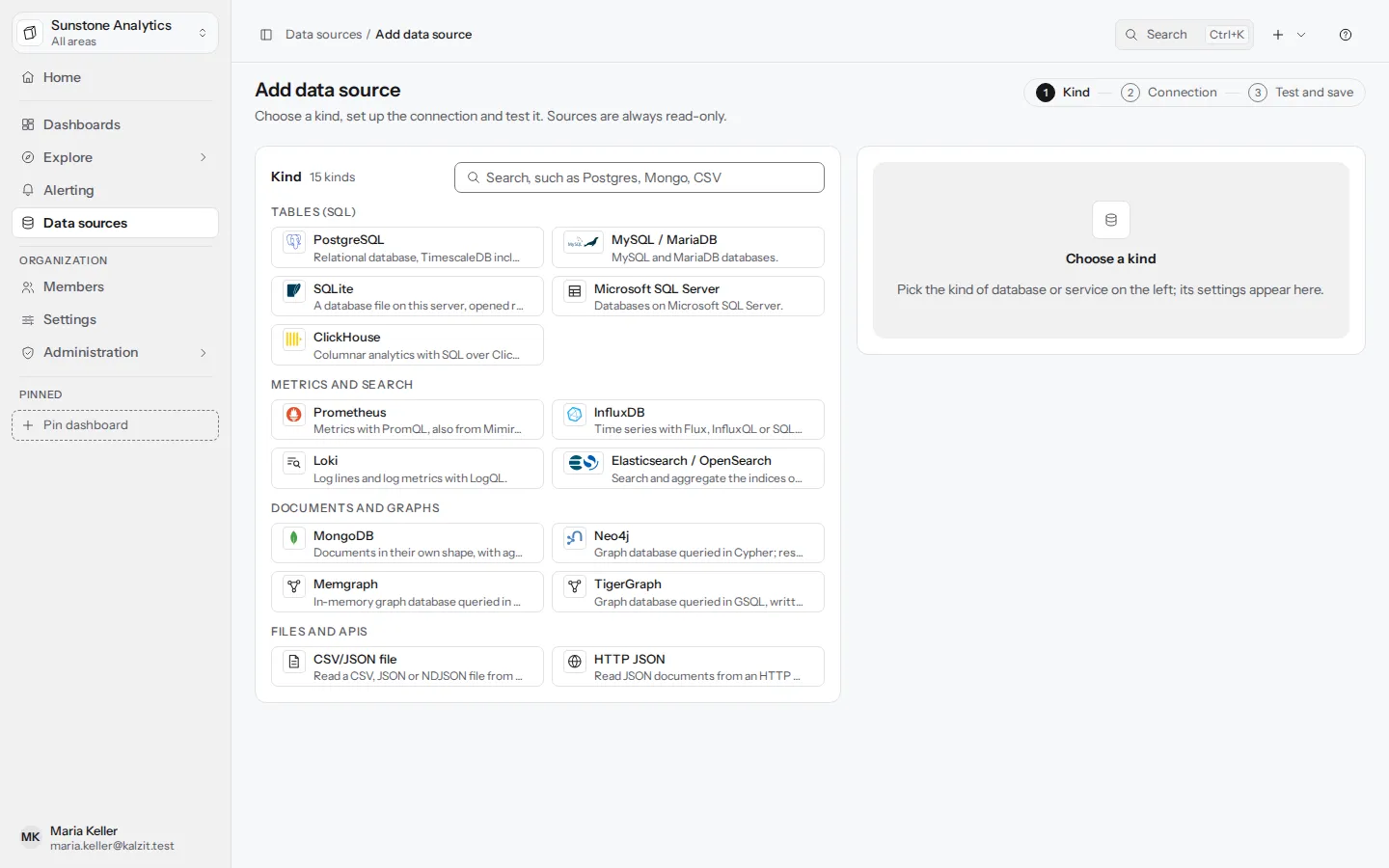
- Kind: cards with the product’s logo and a short description, grouped as Tables (SQL), Metrics and search, Documents and graphs, Files and APIs; search with “Postgres, Mongo, CSV”.
- Connection: a name and the settings, in sections (Connection, Authentication, TLS, Limits, Behavior).
- Test and save: Test connection checks what you entered without saving anything; Add data source saves it. You can test as often as you like (20 times a minute) and save when the result is right, or save first and test later.
Connection strings
PostgreSQL, MySQL and MariaDB, and MongoDB can be entered As a connection string (postgres://user@host:5432/database?sslmode=require, mysql://host/database, mongodb://host/database or mongodb+srv://host/database) instead of fields. Fields and string stay in step. A password you paste moves to the password field and shows only as dots. Anything the string says that has no setting here is refused rather than dropped.
Secrets
Passwords and tokens are stored encrypted and never shown again. When you edit a source you can Keep stored value, Change or Remove a secret. If you change where the source connects (host, port, user, TLS, URL or path), you have to enter its secrets again: Kalzit never sends a stored secret to a new target unasked.
Limits on every source
Query time limit in seconds (1 to 3600) and Row limit for this source; the server-wide limits (default 30 s and 100,000 rows) are the maximum. A result cut off at the row limit says so.
Supported kinds
| Kind | Connection settings | Shape |
|---|---|---|
| PostgreSQL (TimescaleDB included) | Host, Port (5432), Database, User name, Password, TLS mode (disable, prefer, require, verify-ca, verify-full), CA certificate | frame |
| MySQL, MariaDB | Host, Port (3306), Database, User name, Password, TLS mode (disabled, preferred, required, verify_ca, verify_identity), CA certificate | frame |
| Microsoft SQL Server | Host, Port (1433), Database, User name, Password, Encrypt the connection, Trust the server certificate (only for tests), CA certificate | frame |
| SQLite | Absolute path of the file; opened read-only, only from folders an admin allowed | frame |
| Prometheus (also Mimir, Thanos, VictoriaMetrics) | URL, Basic auth user name and password, Bearer token, CA certificate | frame |
| Elasticsearch, OpenSearch | URL, Basic auth, API key or Bearer token, CA certificate, Default index or pattern, Time field (default @timestamp; empty for no time filter) |
documents (hits), frame (aggregations) |
| CSV, JSON, NDJSON file | Absolute path of the file (from a folder an admin allowed for files), File format, CSV delimiter, Decimal mark, “The first line holds the column names” | frame (CSV), documents (JSON, NDJSON) |
| HTTP JSON | URL, Basic auth or Bearer token, Header and value for an API key, CA certificate, Path to the documents in the answer | documents |
| MongoDB | Hosts (comma-separated), “Look up the servers in DNS (mongodb+srv)”, Replica set, Database, User name, Password, Authentication database, Use TLS, CA certificate, Response size limit | documents |
| Neo4j, Memgraph (Cypher over Bolt) | Host, Port (7687), Database, User name, Password, Encrypt the connection, trust and CA settings, Node limit (10,000), Edge limit (50,000) | graph |
| TigerGraph 3.10+ and 4.x (GSQL) | GSQL server URL, REST++ URL, Graph, User name, Password, REST++ secret, CA certificate, Approved installed queries, Node and edge limits | graph |
| ClickHouse (HTTP interface) | URL (port 8123, or 8443 with TLS), Database (default), User name (default), Password, CA certificate |
frame |
| InfluxDB 1.x, 2.x, 3.x (Flux, InfluxQL, SQL) | URL, InfluxDB version (v1, v2, v3), Organization (2.x), Database or bucket, User name and Password (1.x), API token (2.x, 3.x), CA certificate | frame |
| Loki (LogQL) | URL, Basic auth or Bearer token, Loki org ID (X-Scope-OrgID, for multi-tenant setups), CA certificate |
documents (log lines), frame (metric queries) |
| Google BigQuery | Project ID, Location, Default dataset, Sign-in (service account key or workload identity), Maximum bytes billed per query, API URL | frame |
| Snowflake | Account identifier, User name, Private key (key-pair authentication), Warehouse, Role, Database, Schema, URL (private link) | frame |
| Databricks SQL | Workspace URL, SQL warehouse ID, Catalog, Schema, Sign-in (personal access token or OAuth machine-to-machine) | frame |
| Tempo (TraceQL) | URL (port 3200), Basic auth or Bearer token, Tenant ID (X-Scope-OrgID, for multi-tenant setups), CA certificate |
trace (a trace by id), frame (search results, tag values) |
| Jaeger (query service) | URL of the query service (port 16686), Basic auth or Bearer token, CA certificate | trace (a trace by id), frame (search results, services, operations) |
| Graphite (graphite-web, carbonapi) | URL, Basic auth user name and password, Bearer token, CA certificate | frame |
| Redis, Valkey (also Redis Stack: JSON, search, time series) | Host, Port (6379), Database number (0), User name (an ACL user, optional), Password, Use TLS, CA certificate | frame, documents (streams, JSON, search hits) |
| Oracle Database | Host, Port (1521), Service name, User name, Password, Use TLS, CA certificate | frame |
Every kind ends with the query time limit and row limit. A file’s decimal comma and delimiter can be set or left on automatic; a .csv, .tsv or .txt file reads as CSV, .json as JSON and .ndjson or .jsonl as NDJSON.
MongoDB does more than return documents. The Field distribution panel is counted by the database over the whole result, not only the loaded page, with the same read-only login. Live follows a MongoDB query as its data changes when the deployment has change streams (a replica set or a sharded cluster) and the time range is fixed; a standalone server, a view or a range that ends now runs the query again at an interval instead, like every other kind. See Live updates.
Traces from Tempo and Jaeger have a page of their own, Traces, and so do the data warehouses, ArangoDB, Gremlin and Couchbase.
Read-only
Data sources are read-only. Kalzit rejects queries that change data, in every kind:
- SQL sources accept one
SELECTorWITHstatement (parsed, not pattern-matched) and run it in a read-only transaction where the engine has one. - Cypher runs in a read transaction; GSQL is parsed and refused when it writes; MongoDB pipelines that write are refused; search and HTTP sources reach only read endpoints.
- A query that would change data is refused with a message (“Data sources are read-only”).
The settings form still asks for a read-only login, and that is the real protection: a PostgreSQL role with only SELECT, a MySQL user with only the SELECT privilege, a SQL Server login in db_datareader, a MongoDB user with the read role, a Neo4j user with the reader role, TigerGraph’s queryreader. Kalzit refuses MongoDB logins that may do more and servers without access control; for Memgraph and TigerGraph it checks the user’s rights and refuses a user that may write (Memgraph Community needs Allow a user that may write, where only the query check protects the data).
Warning. The query check is a second line of defense. Always connect with a login that can only read.
Graph algorithms (Neo4j GDS, Memgraph MAGE)
Cypher may call the graph algorithms of Neo4j Graph Data Science (GDS) and Memgraph MAGE, but only the ones that read, from a reviewed list; the server checks every query.
- Neo4j GDS: the
streamandstatsmodes of the listed algorithms, such asgds.louvain.stream,gds.pageRank.stream,gds.betweenness.stream,gds.wcc.streamorgds.shortestPath.dijkstra.stream, plusgds.graph.list,gds.versionand helper functions such asgds.util.asNode. Refused: thewriteandmutatemodes,estimate, and every othergds.graph.*procedure,gds.graph.projectincluded. - Memgraph MAGE: the
getprocedures that compute without keeping anything, such ascommunity_detection.get,pagerank.get,betweenness_centrality.getorweakly_connected_components.get. Refused: online modules, loaders, exporters,periodicand algorithms whose work grows too fast with the graph. Start Memgraph with a query timeout (--query-execution-timeout-sec), since it does not stop a running algorithm on its own. - APOC procedures stay refused, as does any procedure not on the list.
A query in Kalzit never projects or drops a GDS graph: an administrator projects it in Neo4j (for example CALL gds.graph.project('people', 'Person', 'KNOWS')), and queries in Kalzit name it:
CALL gds.louvain.stream('people') YIELD nodeId, communityId
RETURN gds.util.asNode(nodeId).name AS name, communityId ORDER BY communityId
gds.graph.list shows every query user the configuration of each graph the login can see, including the Cypher of a Cypher projection; give Kalzit a login that sees only graphs meant for it.
Communities in graph panels. The panel computes communities in the browser for up to 2,000 nodes. For a larger graph from one Neo4j or Memgraph source, and a viewer who may query that source (datasources:query), the database computes them with MAGE or GDS Louvain (Neo4j needs GDS 2.4 or later and the right to run GDS procedures). These queries are fixed in the server, not typed by anyone. The full list is in Data sources in the repository.
Targets
Sources may point at private networks and localhost. Always refused are Kalzit’s own data directory and database, link-local and cloud metadata addresses, and SQLite or other files outside the folders an administrator allowed (the server settings datasources.sqlite_dirs and datasources.file_dirs). Administrators can restrict sources further to a list of hosts and networks (datasources.allowed_targets). A refused address shows “The server does not allow connections to this address”. Only a data source admin can change where a source connects.
Testing a connection
Test connection in the form checks your entries, saved or not; Test in the list checks the stored source. Either way the test checks that the source is reachable, the login works and the login is read-only. It shows the engine and version and the response time (“Connected in N ms”), or the reason for failure. A login with administrator rights (a PostgreSQL superuser, a SQL Server sysadmin) is reported with advice to use a read-only login.
Access per team
Beyond their role, members, teams or roles get access to a single data source with Manage access… (in the side panel or the form): Can query (own queries in Explore and panels), Can edit (also change the connection and its settings) and Can manage (also decide who has access). Revoking cuts free queries, tests and schema reads at once. A member who may not see a source gets “not found”. See Administration.
Trash
Delete… moves a data source to the Trash (Data sources > Trash). Dashboards that use it show an error until you Restore it. Only members who may change data sources see the trash.