Kalzit is in early development. These pages describe what exists today and change as the milestones progress. Screenshots show the development version with demo data.
Plugins
Plugins add data source kinds and panel types to Kalzit. A data source plugin runs as a process of its own in a sandbox of the operating system; a panel plugin runs in your browser, in a frame sealed off from Kalzit (“Panels of plugins” below). A plugin is loaded only when its signature fits a trusted key: Kalzit’s own key or a publisher key a server admin added. Installing, trusting and approving plugins is for server admins; organizations can block a plugin for themselves. API: plugins.
The page is Settings > Plugins (Einstellungen > Plugins), in the Server group, with three
tabs: Installed (Installiert), Catalog (Katalog) and Signature and trust (Signatur und
Vertrauen). Each tab has its own address (/settings/plugins, #catalog, #trust), and each
plugin its own page (its id after /settings/plugins).
Installed plugins
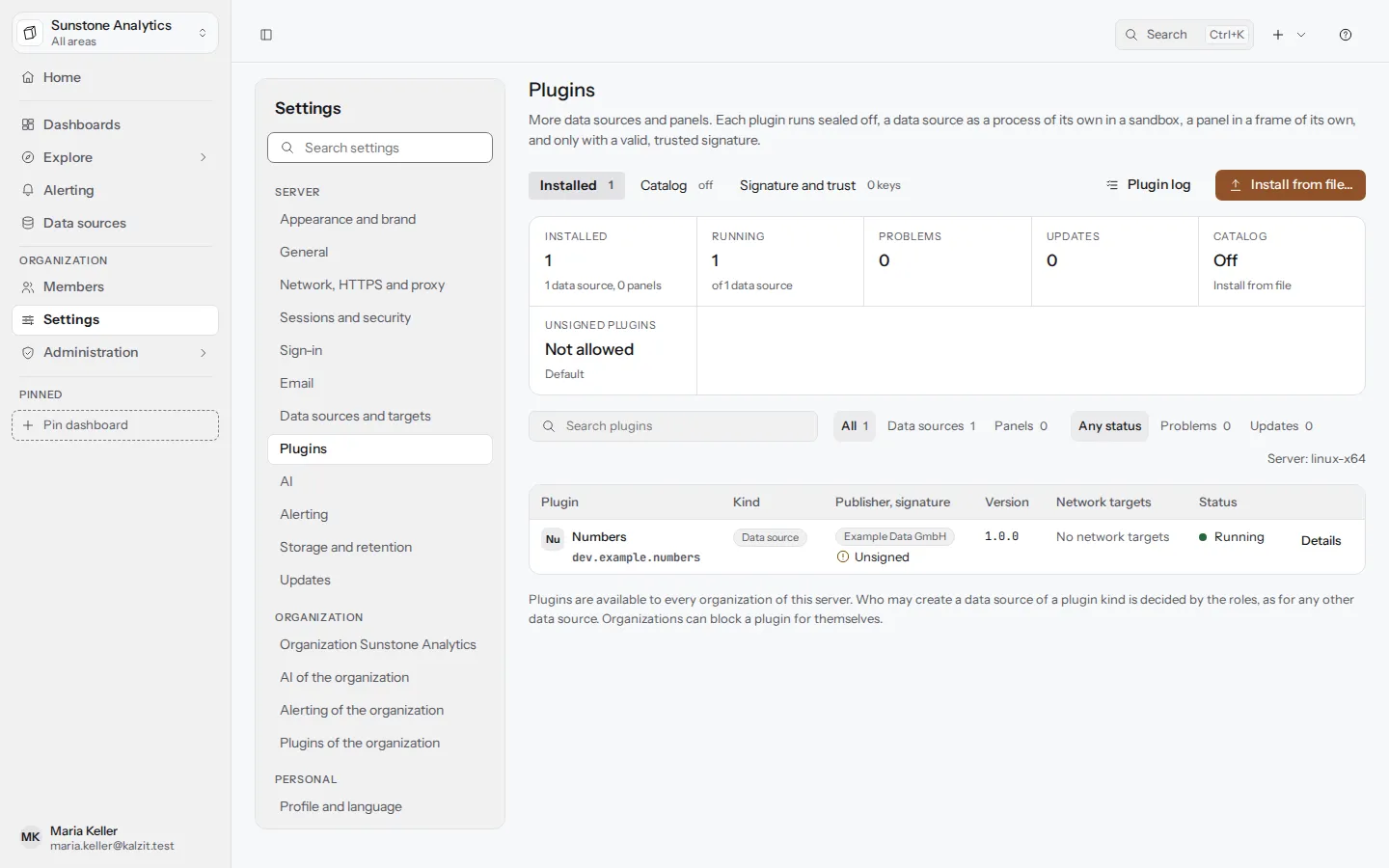
A strip on top counts the installed plugins, how many run, the problems, waiting updates, the catalog and whether unsigned plugins are allowed. All, Problems and Updates filter the table, which shows per plugin:
- Plugin: its name and id, which is also the id of its data source kind or panel type.
- Kind: Data source (Datenquelle) or Panel.
- Publisher, signature: the publisher as the manifest names it (a neutral badge, not a confirmed identity) and the signature: Signed by Kalzit, Signed with the key id in groups of four, Unsigned, or Key no longer trusted.
- Version, with an update that waits for approval.
- Network targets: the targets the plugin declares, fixed hosts such as
license.example.dev:443 (tls)or “the host in the settinghost”. - Status as a dot and a word: Waiting for approval, Turned off (Ausgeschaltet), Ready, starts when needed, Running (Läuft), Crashed (Abgestürzt) with the time until the next attempt and the attempt number, Stopped (Angehalten) after repeated failures, Not loaded with the reason (for example a Linux server without Landlock), and Stopped: key not trusted.
Install from file
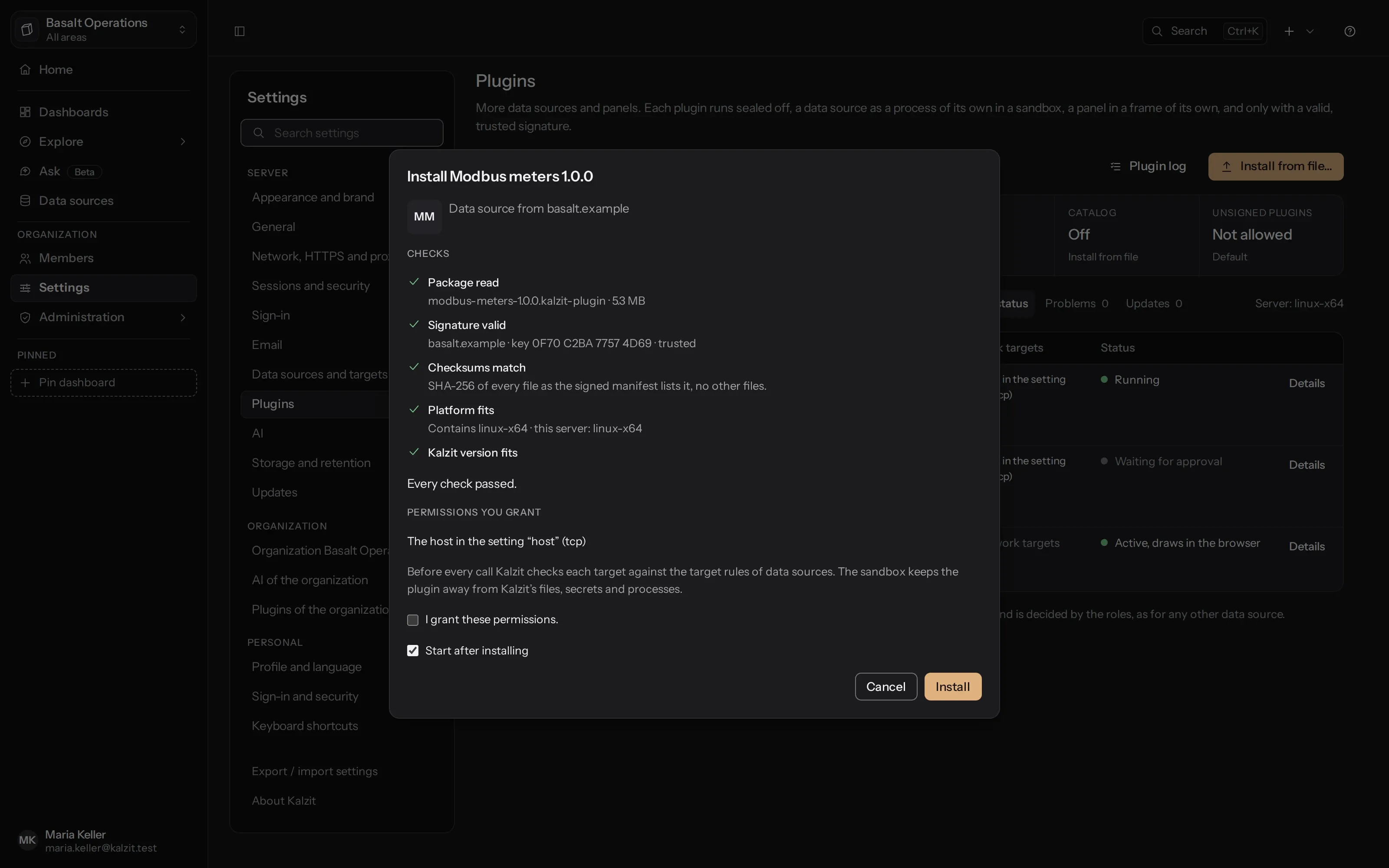
Install from file… (Aus Datei installieren) works without internet, for every plugin. Drop the package (a zip file, at most 256 MiB) on the dialog or choose it. The server checks it before anything in it runs, and the dialog shows the checks from its answer:
- Package read: name and size.
- Signature valid: who signed it, with the key id. An unsigned package shows Not signed with a warning, and only installs while unsigned plugins are allowed.
- Checksums match: every file as the signed manifest lists it, no other files.
- Platform fits: the platforms the package contains and this server’s.
- Kalzit version fits.
- For an update: Replaces version…, or waits for approval when it reaches new targets (the installed version keeps running meanwhile).
Below, Permissions you grant lists the network targets. For an update, targets it adds are marked new in the version and set in bold, the others as before. Nothing runs before you tick I grant these permissions. and press Install; Start after installing turns the plugin on right away. Cancel removes a new plugin again.
A refused package names the step that failed and why, and the steps after it are skipped:
- Signature does not match the content: the package was changed after signing or is damaged. Always refused, also when unsigned plugins are allowed.
- Publisher not trusted: the signature is valid, but its key is not trusted. Check key and trust… opens the key dialog and compares the key you paste with the one that signed the package.
- No matching platform, Needs a newer Kalzit, Files do not match the manifest, and the refusals of updates (another plugin, an older version, another key, or another kind: a panel plugin never becomes a data source plugin or the other way round; remove it and install the package as a new one).
- A signed update of a plugin that was installed unsigned is a change of publisher: the dialog says the installed plugin is unsigned, names its version and the data sources whose passwords are cleared, and installs only after you type the server’s name.
A plugin’s page
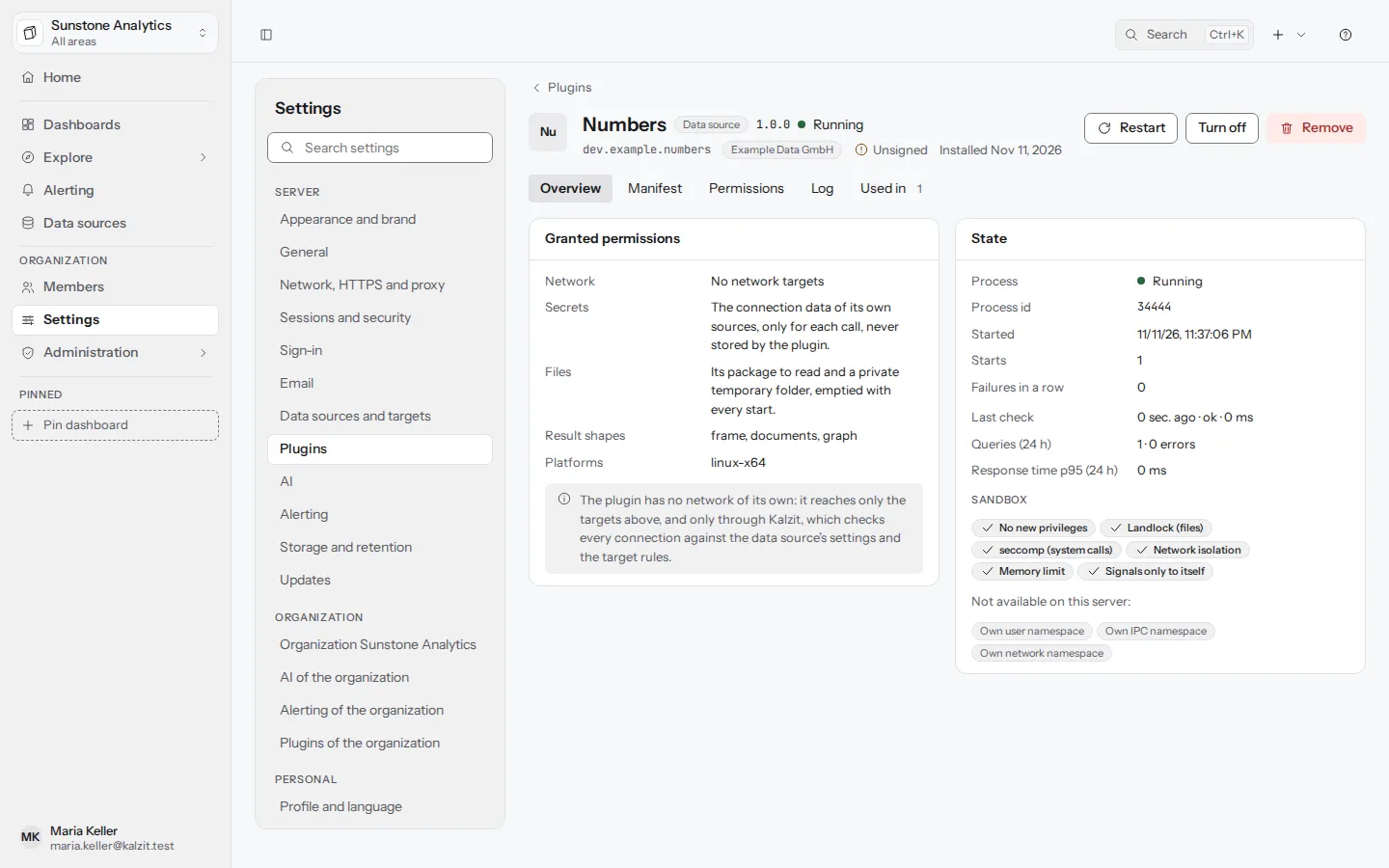
The page shows the plugin’s id, publisher, signature, license and installation date, and:
- Approve permissions… for a plugin not approved yet, Approve update to… for a waiting update, Restart, Turn on or Turn off, and Remove.
- Overview: the granted permissions (network targets, the connection data of its own sources for each call, its package and a private temporary folder) and the state of the process: process id, start time, starts, failures in a row, the last error and the sandbox layers in force and missing on this server.
- Manifest:
kalzit-plugin.tomlfrom the package, as signed. - Log: stdout and stderr of the process (the last 2000 lines), filtered to stderr if you like, refreshed and downloaded as a text file.
- Used in (Genutzt in): the data sources of the plugin’s kind in every organization.
A crashed plugin says when it starts again: restarts wait 10 s, 30 s, 1, 2, 5 and 10 minutes, and after that the plugin stays stopped until Restart now. A crash fails only the queries of its own kind.
Remove asks first and says how many data sources in how many organizations use the plugin. They stay with their settings and answer “kind not available” until it is installed again. Turn off keeps the plugin installed; its sources answer the same until it is turned on.
Signature and trust
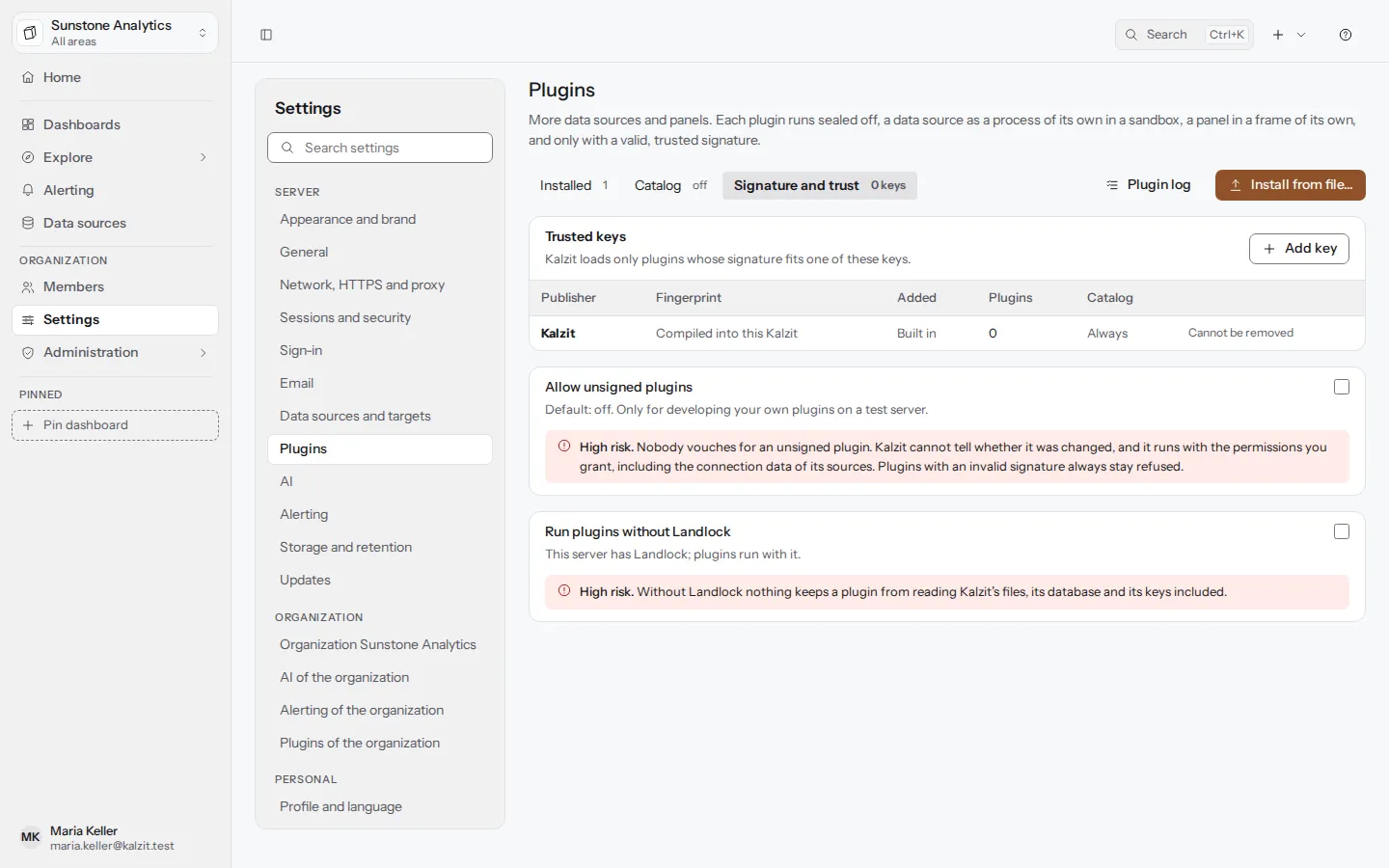
Trusted keys (Vertrauenswürdige Schlüssel) lists Kalzit’s own key (built in, cannot be removed) and the publisher keys added here, with fingerprint, date and the plugins they signed.
- Add key: the publisher’s name and the public key as the publisher gives it (base64 or 64 hex digits, also as a PEM block). The dialog shows the fingerprint, the key id in groups of four; compare all 16 characters with the publisher’s, for example on their website, and tick I compared the fingerprint.
- Remove: when the key signed installed plugins or waiting updates, the dialog names the plugins that stop and the updates that are dropped; Remove and stop removes it.
Allow unsigned plugins (Unsignierte Plugins erlauben), off by default, is meant for developing your own plugins on a test server. Turning it on asks for the server’s name as a confirmation. While it is on, a band on every plugin page says so, with Turn off. A broken signature stays refused either way; unsigned plugins installed meanwhile keep running when it is turned off again.
On Linux, Run plugins without Landlock lets plugins start on a server whose kernel offers no Landlock. Without Landlock nothing keeps a plugin from reading Kalzit’s files; the switch also asks for the server’s name. Without the switch, a plugin whose network cannot be limited (no seccomp filter and no network namespace) does not start at all.
Catalog
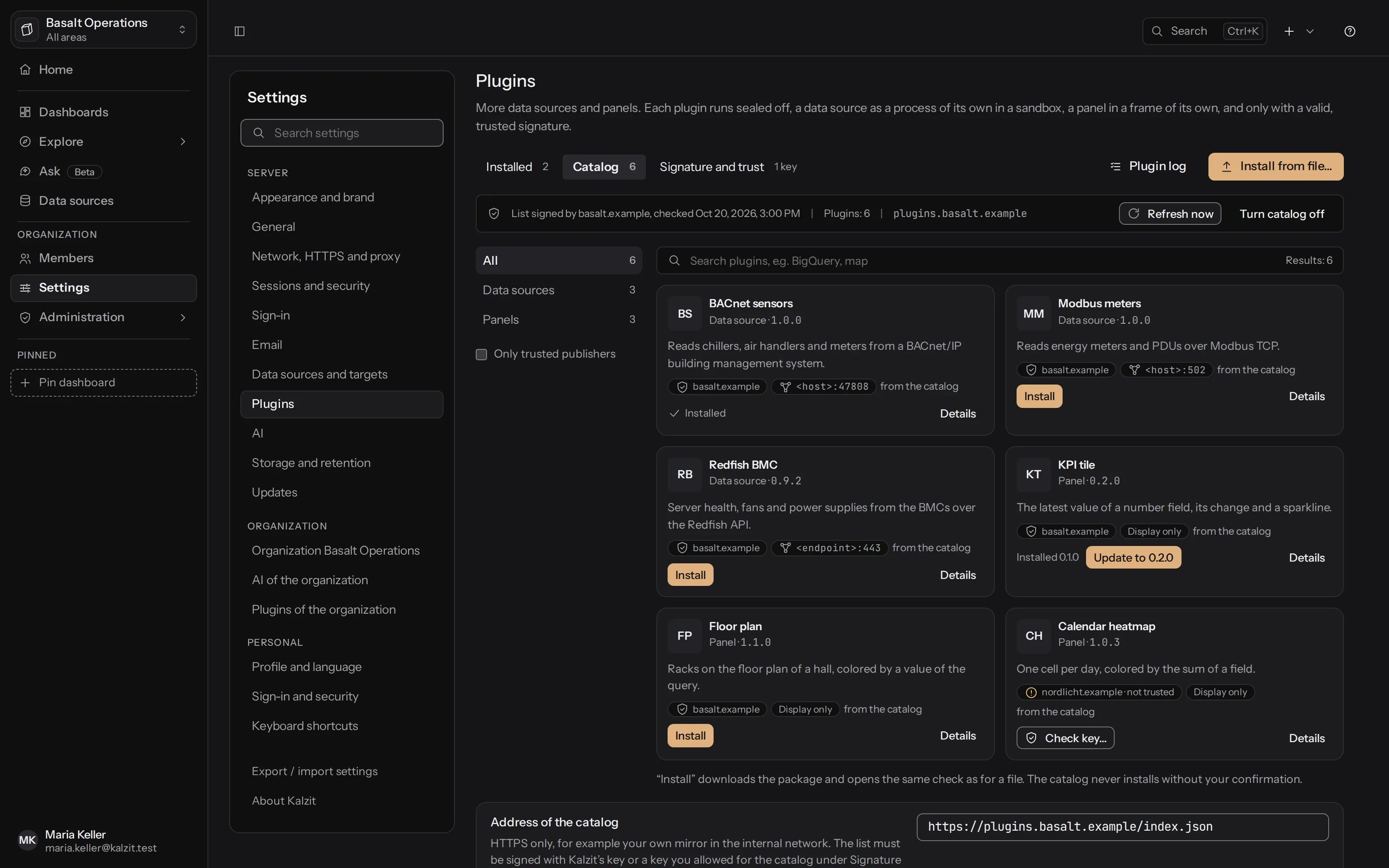
The catalog (Katalog) is a signed list of plugins to install from. It is off by default, and while it is off Kalzit makes no connection for it. Installing from a file always works, with or without it.
To use it, a server administrator enters the Address of the catalog (Adresse des Katalogs) on
the Catalog tab, an https:// address of the list, and turns on Use the catalog (Katalog
verwenden). There is no address by default; it can be the project’s catalog or your own mirror in
the internal network. The list must be signed with Kalzit’s plugin key or a publisher key you
allowed for the catalog: under Signature and trust, Allow for the catalog… (Für den Katalog
erlauben…) on a trusted key, after a confirmation. Trusting a key for plugins alone does not let
it sign the catalog. The signature lies next to the list at the same address with .sig
appended. Packages and redirects on other hosts than the catalog’s own must be public addresses,
and the catalog address can never be Kalzit itself. Load again every (Erneut laden alle)
sets how often Kalzit loads it (24 hours by default). Load via proxy (Über Proxy laden, on by
default) sends the list and the plugin downloads through the proxy from Network, HTTPS and
proxy; turned off, they go out directly. Without a proxy there it changes nothing. The four
settings can also be set in the environment (KALZIT_SETTING_PLUGINS_CATALOG_ENABLED, ..._URL,
..._REFRESH_HOURS, ..._USE_PROXY); the tab then shows them read-only.
Kalzit loads the list itself, with the same target rules as data sources (allowed targets, metadata addresses refused), over HTTPS only, and sends nothing but its version and platform. It takes a list only when
- its signature verifies with a trusted key; a list that was changed is always refused,
- it is newer than every list taken before from the same key: an older one (a rollback) is refused, also after the address changed,
- it has not expired: every list says until when it is valid (at most 31 days), and an expired list offers nothing to install.
When a check fails, the tab says why and keeps the list taken before; Refresh now (Jetzt aktualisieren) tries again at once.
The list shows each plugin with its kind, version, publisher, the key that signs it and whether you trust it, and the network targets it declares, with a search and Only trusted publishers (Nur vertraute Herausgeber). The categories on the left are a tree: Data sources and Panels, each with the categories the list names for its plugins (such as Databases or Maps). Details shows the key id, the package’s size, source and SHA-256. Install (Installieren) or Update to… (Auf… aktualisieren, offered when the list has a newer version than the installed one) downloads the package and opens the same check as Install from file: the package must be exactly the one the list names (size, SHA-256, id, version, kind, key and network targets), signed by a trusted key (never unsigned, whatever the switch for unsigned plugins says), and then every check of a file follows, with the permissions to grant before anything runs. Until a version is installed here, its kind and network targets are what the list says and marked from the catalog (laut Katalog); once its package is here, they are the package’s own. For a plugin installed unsigned, a signed version in the list is not offered as an update: Review signed… (Signierte… prüfen) leads to the confirmation of a change of publisher. A publisher whose key you do not trust has Check key… (Schlüssel prüfen…), which opens Signature and trust to compare and add the key. Data source plugins and panel plugins install from the catalog alike; a panel is then a visualization in the panel editor as after an install from a file.
The list can withdraw versions (for example after a security problem): they are marked Withdrawn (Zurückgezogen) and cannot be installed, and an installed version the list withdraws is named at the top of the tab, with the reason. Refreshing the list by hand and every install from it are recorded in the audit log, as are changes of its settings.
Plugins of the organization
Settings > Plugins of the organization (Plugins der Organisation), for members with
plugins:configure (admins and owners), lists the server’s plugins with a switch Offered
(Angeboten). A plugin turned off here is not offered in Add data source, and the
organization’s sources of its kind answer “kind not available”. The change applies at once and
can be undone.
Data sources of plugin kinds
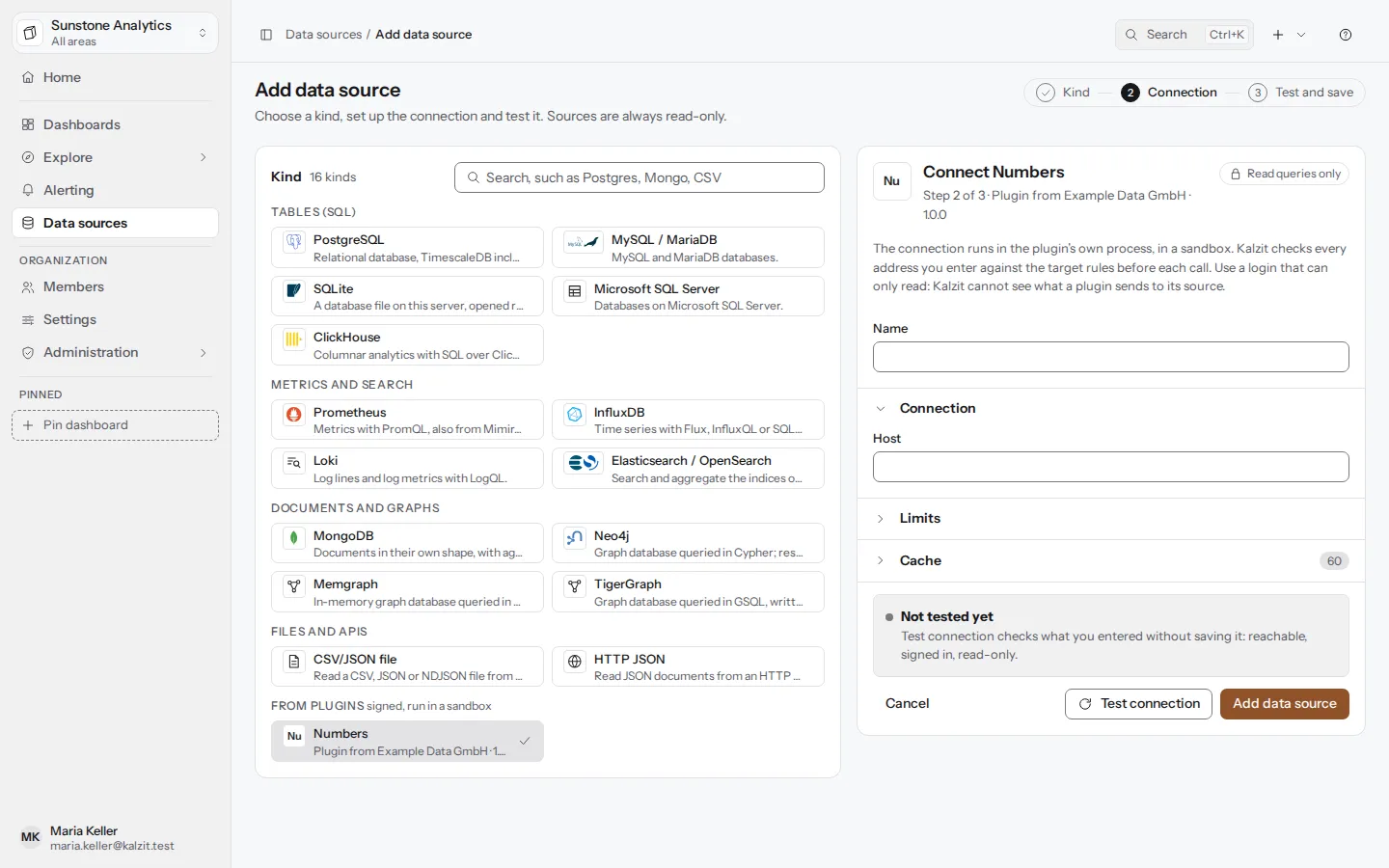
In Add data source the plugin kinds have a group of their own, From plugins (signed, run in a sandbox), each with the plugin’s letters and “Plugin from publisher · version”. The form uses the labels and help texts of the plugin’s manifest in your language. In the data source list a source of a plugin kind carries a neutral badge Plugin · publisher.
In Explore and the panel editor, a source of a plugin kind takes its query as one JSON object, in the form the plugin describes (see its documentation); Kalzit sends it as written.
Panels of plugins
An installed, approved and enabled panel plugin is a visualization like the built-in ones: in the panel editor under Visualization, after the built-in types, with a Plugin badge and the publisher its manifest names. Its options appear under Visualization options, made from the plugin’s manifest.
The panel draws the results of the panel’s own queries, nothing else: it runs in a sandboxed frame without network, cannot read your session, cookies or other panels, and cannot call Kalzit. (One gap is left to the browser: a browser that does not know the policy that blocks WebRTC would let a panel open WebRTC connections; install panel plugins only from publishers you trust.) It may ask for more height, change its options while you edit the panel, and ask to open a link: Kalzit then shows where it goes (Goes to, the site in bold), the full address and the link’s title as Text from the plugin, and opens it only when you choose Open. Addresses with hidden or direction-changing characters are refused. A panel that does not start within 10 seconds, or tries to leave its frame, shows an error with Try again. When its plugin is turned off, removed or blocked for your organization, the panel says so instead.
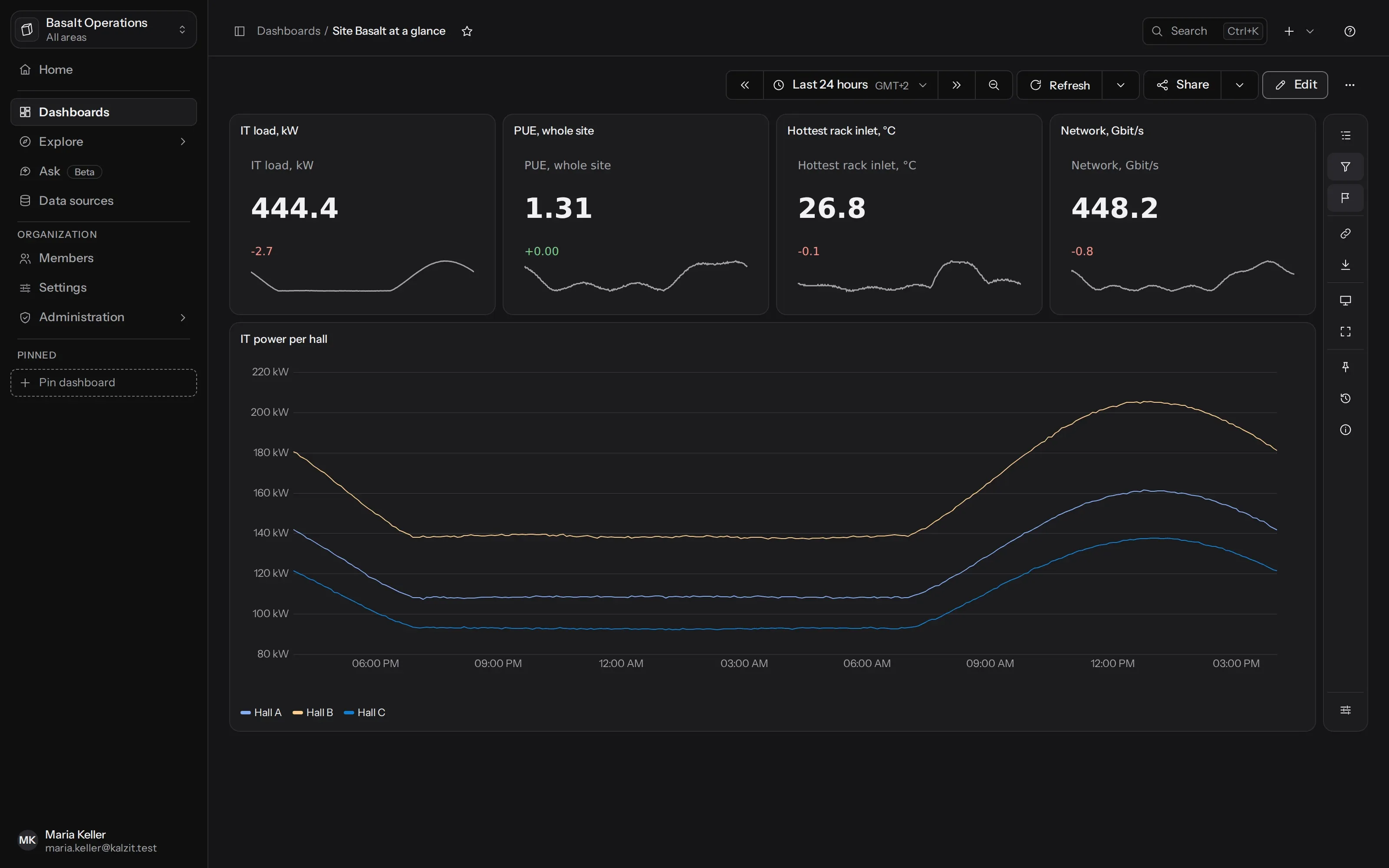
The release comes with the example panel KPI tile (dev.kalzit.panel-kpi, signed with
Kalzit’s key): the last value of a number field with a sparkline, with the options Field,
Decimals and Label.
Viewers see a plugin’s panels on the dashboards they may read; adding one needs the right to edit the dashboard. The browser’s developer console shows a plugin’s log lines and what Kalzit refused from it, for the plugin’s author.
Sandbox and network
A data source plugin runs in a sandbox of the operating system, and the plugin’s page lists the layers in force and any that are missing on this server:
- Windows: a restricted token at low integrity in a job object (memory and process limits,
ended with Kalzit), inside an AppContainer of its own without network access. A plugin can
read neither Kalzit’s data folder nor other processes. On Windows plugins do not start while
one of Kalzit’s files with secrets (
kalzit.tomlwith a password, the TLS key) is readable by them; the plugin’s page names the file. A file other local accounts may read is a warning there. - Linux: Landlock (the file system read-only and visible only where needed), a seccomp filter that refuses network sockets and other risky system calls, and, where the system allows it, user and network namespaces. Without Landlock plugins do not start unless Run plugins without Landlock is on, and they never run while Kalzit runs as root.
A plugin has no network of its own. It asks Kalzit for every connection, and Kalzit connects only to a target the plugin’s manifest declares for that data source’s settings, checked against the data source target rules (allowed targets, cloud metadata addresses refused) and never to Kalzit itself; then it passes the connection through. Refused connections appear in the plugin’s log and in the audit log. The exact lists are in the API reference and its section “Network connector”.
Writing plugins
Data source plugins are written in Rust with the Kalzit plugin SDK (plugin-sdk/), and packaged
and signed with the kalzit-plugin tool; panel plugins are a JavaScript bundle that speaks the
panel message API. The author guide is Writing plugins, with the
examples in examples/plugins (“CSV and JSON over HTTP”, dev.kalzit.csv-http, and the KPI tile).